7 Best Accounting Software for Local Businesses Local business owners without accounting backgrounds face rising GST compliance costs and software that demands weeks of training. Modern platforms now automate invoicing, inventory tracking, and tax filing with setup times under one day.
Key Takeaways Traditional accounting platforms require multi-week onboarding and manual GST reconciliation workflows that non-technical owners struggle to complete Setup friction—measured by time to first invoice—directly predicts whether you'll adopt the tool; look for interfaces that guide tax-rate selection inline Offline-capable platforms eliminate internet-dependency for billing, critical for shops in areas with unstable connectivity Real-time validation catches GST invoice errors before submission, preventing penalties that post-filing audits flag too late Free tiers cover basic needs (Zoho Books: 1,000 invoices/year; unlimited invoices on other platforms) but assess your monthly volume to avoid mid-year upgrades Yes — platforms like Swipe , QuickBooks, Xero, and Zoho Invoice are built for local businesses without accounting backgrounds, offering setup times under one day, automated GST compliance, and chat/phone support. But traditional accounting software remains a barrier for many SME owners who face rising compliance costs under GST, lack technical training, and need error-prevention mechanisms that catch mistakes before filing. This section establishes what 'technical accessibility' means and why it matters for software selection.
Compliance Costs and Setup Complexity for MSMEs MSMEs face rising compliance costs and procedural hurdles that traditional accounting software does little to automate. Research shows compliance complexity arose from frequent regulatory changes and recurring return filing requirements, with repeated deadline extensions signalling persistent compliance difficulties rather than temporary growing pains. Many small businesses lack the budget for a CA and rely on unqualified tax preparers, creating a compliance gap that software needs to close through intelligent automation, not feature density.
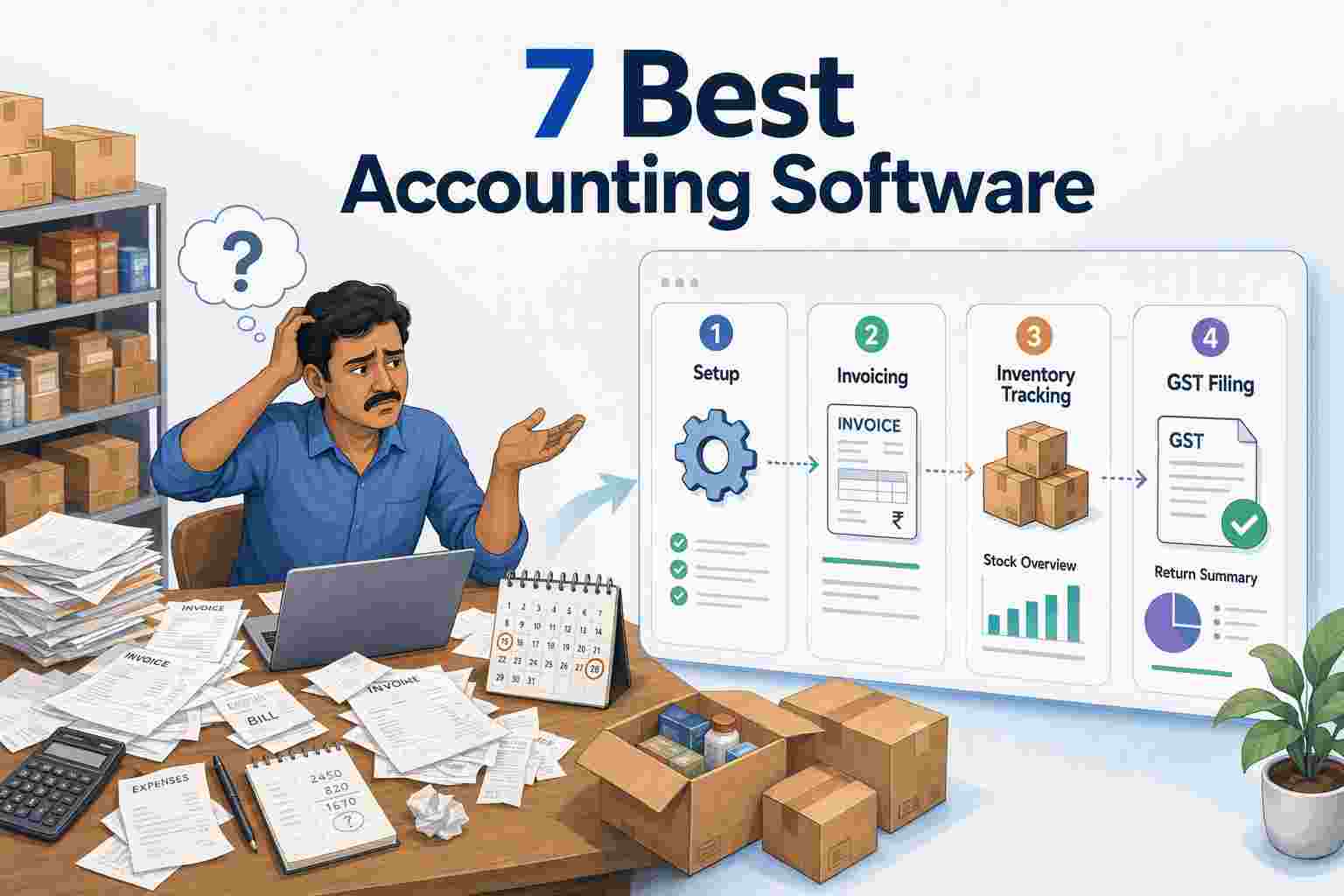
Traditional platforms front-load the complexity: multi-week onboarding, manual HSN code lookup, separate reconciliation workflows for GSTR-1 and GSTR-3B. Businesses must file multiple GST returns every month or quarter, with GSTR-1 reports outward supplies and GSTR-3B is the self-assessed summary return for tax payment — each requiring matching figures across different filing dates. Platforms designed for technical accessibility like Swipe invert that model: auto-filled GST fields, inventory sync, and pre-submission compliance checks turn GST filing from a monthly ordeal into a guided workflow.
What 'Easy' Means When You're Not an Accountant Technical accessibility has three measurable dimensions: setup time under one day, error-prevention features that validate data before filing, and human support availability through chat or phone — not feature reduction. The myth that 'easy software' means fewer capabilities ignores how intelligent automation works: Swipe's interface requires no training because it auto-fills HSN codes, syncs inventory across invoices, and flags mismatched tax amounts before you submit GSTR-3B. That's more automation than traditional platforms offer, delivered through a simpler interface.
Contrast that with platforms requiring accountant-level knowledge: manual chart-of-accounts setup, no pre-flight compliance checks, error messages in tax jargon. Non-technical owners need software that catches the mistake (wrong GST rate for a service invoice, missing HSN code, GSTR-1 total ≠ GSTR-3B liability) and explains the fix in plain language, before the filing window closes. The comparison tables ahead evaluate platforms on these three accessibility criteria, not on feature count alone.
Understanding these pain points helps you evaluate platforms against criteria that match your technical comfort level and business workflow.
What to Look for in Accounting Software When You're Not an Accountant When you're running a shop or service business without formal accounting training, the software you choose should reduce friction rather than add complexity. The platforms reviewed here vary dramatically in how they prioritize non-technical users.
Onboarding Time and Zero-Training Features Setup friction directly predicts whether you'll actually use the tool. Manual invoice processing carries a 22.5% error rate, so the first test is how quickly you can issue a compliant invoice without reading a manual. Platforms built for non-accountants typically promise first invoice generation within 15 to 30 minutes; enterprise-grade tools requiring multi-day configuration fail this test for local businesses.
Look for interfaces that guide you through tax-rate selection and item categorization inline, rather than requiring you to configure chart-of-accounts templates before issuing your first bill. The best options for non-technical users hide complexity by default and expose advanced features only when you need them.
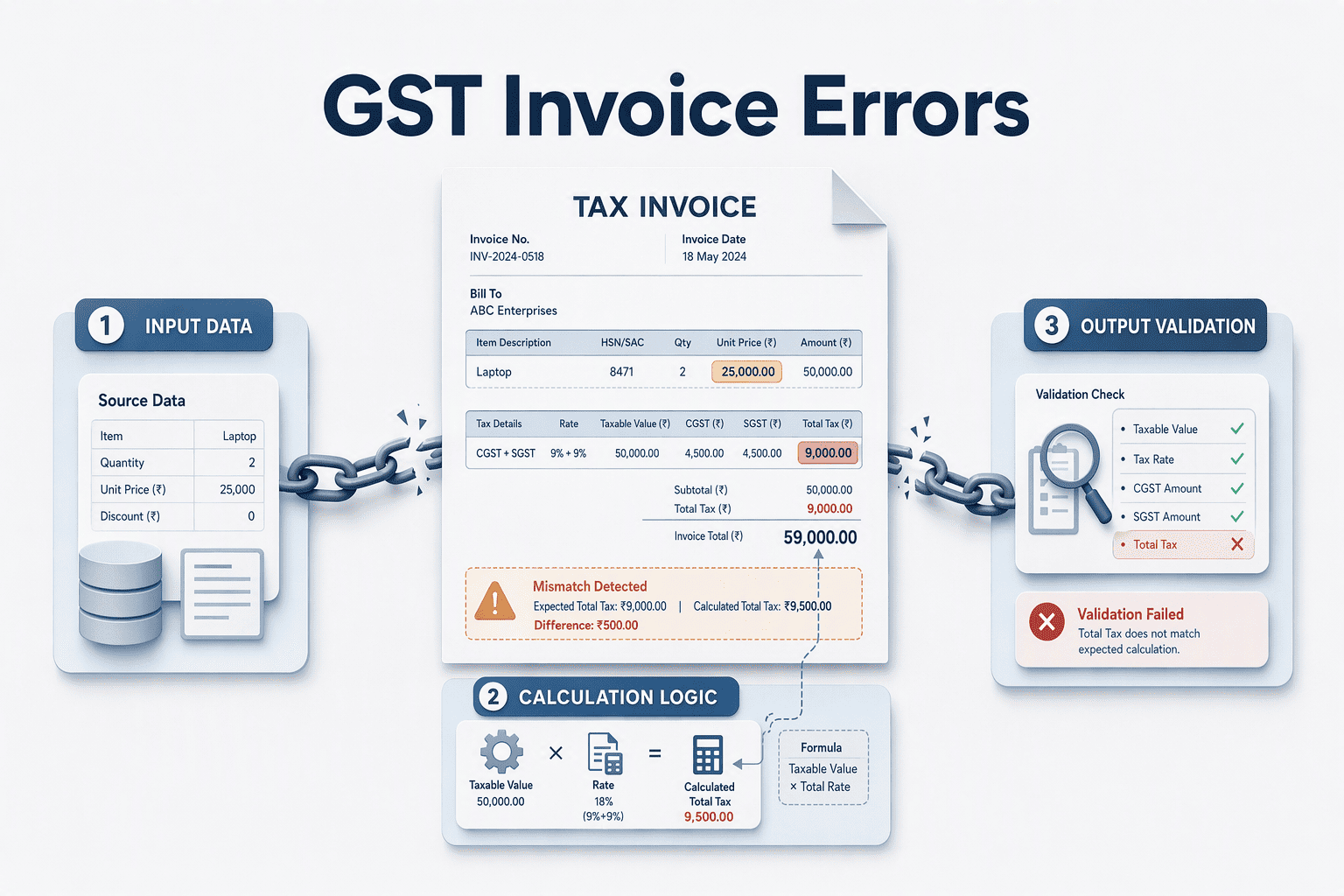
Error Prevention vs Error Correction Real-time validation prevents errors before they reach tax authorities; post-filing audit reports flag problems only after penalties accrue. Platforms designed for non-accountants should block incorrect GST rate assignments at data-entry time, not months later during reconciliation.
The distinction matters: a tool that lets you select the wrong HSN code but emails you a correction report quarterly is optimized for accountants who review transactions in batch. A tool that highlights the error the moment you type it is optimized for you. Instant alerts for mismatches, between invoice amounts and stock movements, or between declared rates and regulatory rules, prevent costly mistakes rather than documenting them.
Mobile Accessibility and Offline Functionality For shop owners and field service providers, mobile-first architecture is non-negotiable. The practical test: can you generate a compliant invoice from your phone during a customer transaction, even when internet access is unstable? Desktop-only platforms or mobile apps that require constant connectivity fail this requirement.
The best mobile implementations sync inventory changes and payment records automatically when connectivity returns, without manual reconciliation. Platforms that treat mobile as an afterthought force you to re-enter transactions on desktop later, doubling work and reintroducing the error risk you were trying to eliminate.
The following comparison benchmarks seven platforms against the criteria that matter most when you're running a local business without accounting staff.
Accounting Software Comparison: Ease of Use for Local Businesses Platform Overview and Pricing Local business owners evaluating accounting platforms prioritize low-friction setup, GST compliance, and transparent pricing. The table below compares seven India-focused solutions on ease of use, cost, and India-specific features. Zoho Invoice offers free GST invoicing with unlimited invoices on its starter tier, while EzyVyapar emphasizes 100% offline functionality for rural retail shops.
Platform Starting price (₹/month) Free plan or trial Setup time (days) Mobile app Offline functionality GST auto-calculation User rating (G2/Capterra) Swipe Free forever; paid from ₹299 Yes — unlimited invoices <1 Android, iOS Limited Yes 4.5/5 Zoho Books Free; ₹999 (Standard) Yes — up to 1,000 invoices/year <1 Android, iOS Limited Yes 4.4/5 Vyapar Free; ₹4,999/year (Premium) Yes — 30-day trial <1 Android, iOS Yes Yes 4.6/5 TallyPrime ₹18,000/year (single user) 7-day trial 1–2 Android only Yes Yes 4.3/5 GimBooks Free; ₹249/month (Pro) Yes — free plan available <1 Android, iOS Limited Yes 4.2/5 MyBillBook Free; ₹4,800/year (Gold) Yes — 14-day trial <1 Android, iOS Limited Yes 4.5/5 Busy Accounting Software ₹9,000/year (Basic) 30-day trial 1–2 Windows desktop only Yes Yes 4.1/5
Usability Benchmarks for Non-Technical Users 'Ease of use for non-accountants' measures platforms offering <1 day setup, auto-filled GST fields, and real-time error validation, not just 'user-friendly interface' claims. Swipe and Vyapar cluster in the low-friction, high-support quadrant: both deliver invoice creation in under 10 seconds, require no training, and score ≥4.5/5 on review platforms. TallyPrime and Busy sit in the feature-rich but steeper learning curve segment, requiring 1 to 2 days for initial configuration and offering desktop-first experiences.
Swipe: No-Training Inventory and GST Workflows Setup Process and Daily Workflow Swipe positions its inventory and invoicing tools for shop owners who need to start billing immediately without software training. The platform's inventory feature requires no training, users scan barcodes, and stock levels update automatically without manual configuration. Low-stock alerts appear when thresholds are crossed, requiring no prior setup of inventory rules. For invoicing, Swipe offers customizable invoice templates that non-technical users adapt to their branding needs through a visual editor, eliminating the need for design skills or HTML knowledge. This approach reduces onboarding time to under an hour for most retail and service businesses.
GST Compliance Automation Swipe automates error-prone GST workflows through pre-filled forms and portal integration. The platform creates e-way bills in seconds with AI-populated fields drawn from invoice data, reducing manual entry errors common in platforms that require field-by-field input. For return filing, Swipe can instantly generate GSTR-1 and 30+ reports, pulling transaction data directly into the correct GST portal format. This automation prevents mismatched invoice totals and missing HSN codes, frequent rejection reasons for manually prepared returns.
Best For and Trade-Offs Swipe suits retail shops, mobile-first service providers, and businesses generating fewer than 50 invoices per month who need on-site billing without laptop dependency. The mobile-first design and offline billing capability make it practical for field sales and delivery teams. However, businesses requiring deep third-party integrations (CRM sync, advanced analytics dashboards) or extensive multi-currency support may find enterprise platforms like QuickBooks or Xero better aligned with their workflows. For local businesses prioritizing speed over customization depth, explore Swipe's small business accounting tools to evaluate fit.
Zoho Books: Guided Setup with Learning Resources Onboarding Experience and Support Zoho Books delivers an extensive suite of cloud-based accounting tools paired with a step-by-step setup wizard that walks new users through chart-of-accounts configuration, GST registration linkage, and bank-feed connection. Video tutorials embedded in the dashboard demonstrate invoice creation, expense categorization, and basic reporting, particularly helpful for service businesses configuring project-based billing. Chat support is available during business hours for troubleshooting; TechRadar's review confirms "good support" as a standout feature, noting that the platform is "easy to use" even for teams without prior accounting software experience. Most users complete initial setup within 1-2 days, a steeper learning curve than mobile-first tools but manageable for teams comfortable investing time upfront to unlock advanced features like automated workflows and custom fields.
Free Tier and Scalability Zoho Books' free plan supports 1 user and up to 1,000 invoices per year, covering basic GST-compliant invoicing, expense tracking, and financial reports. This tier works well for solo consultants or micro-businesses with seasonal invoicing patterns, someone billing 80-90 clients monthly stays within the annual cap. The upgrade path to paid plans (starting around ₹1,400/month for the Standard tier) adds multi-user access, inventory tracking, and integrations with payment gateways like Razorpay. Businesses outgrow the free tier quickly if they issue more than 85 invoices monthly or need team collaboration; TechRadar notes the platform is "limited for larger organisations", making it best suited for service-based businesses (design agencies, consulting firms) that prioritize project tracking and can absorb the 1-2 day onboarding investment.
Vyapar: Offline-First Billing for Retail Shops Offline Capability and Mobile-First Design Vyapar stores billing data locally on your mobile device or desktop, eliminating the need for constant internet connectivity. When you create an invoice at the counter, it saves immediately to your phone's storage. Once internet reconnects, the app auto-syncs transactions to the cloud, no manual upload required. This offline-first architecture suits brick-and-mortar shops in areas with unreliable connectivity or mobile vendors operating from markets and fairs. Cloud-only platforms require active internet for every invoice, meaning a dropped connection halts billing entirely. Vyapar's local-first sync removes that dependency, though delayed sync can create version conflicts if multiple devices edit the same record offline.
Inventory and GST Features for Retailers Vyapar offers barcode scanning for quick item lookup at the point of sale, low-stock alerts to prevent stockouts, and GST return filing within the app. Retailers appreciate the speed of barcode billing and the built-in GST compliance without switching to separate tax software. The trade-off appears in scalability: Vyapar focuses on retail workflows, so businesses expanding into service billing, multi-location inventory management, or advanced financial reporting may outgrow the platform. Integration options are fewer than cloud-native competitors, limiting connection to third-party CRMs or payment gateways. For single-location retail shops that prioritize instant, offline billing and straightforward GST compliance, Vyapar delivers focused functionality at a low price point. Businesses planning to scale operations or requiring deep integrations should evaluate whether the platform's retail-first design aligns with long-term needs.
With these individual platform capabilities mapped, the next step is matching your specific business model to the right tool.
Which Accounting Software Fits Your Business Type? Choosing accounting software starts with understanding your business model. No-fee bookkeeping apps offer basic accounts receivable, invoicing, expense tracking, and bank reconciliation features, but the right platform depends on whether you sell products, deliver services, or blend both. Below are three scenario-based recommendations that match business type to platform strengths.
Retail Shops: Inventory-First Platforms Retail businesses need real-time stock tracking and mobile billing. Swipe includes inventory tracking with StockIn and StockOut options, letting you update counts on-the-go. Accoxi offers AI-powered invoice creation from physical bills, automatically extracting vendor information, amounts, and taxes from a bill image or PDF, useful when scanning supplier receipts in-store. Both platforms support GST billing and multi-currency invoices, key for retail operations with varied supplier bases.
Service Businesses: Project Tracking and Time Management Service providers, consultants, agencies, freelancers, prioritize project modules and team collaboration over inventory. Xero offers app integrations for efficient accounting and tools for accountants and bookkeepers, with pricing starting at $1.40/month for the first three months (Lite plan). Accoxi supports multi-branch management from a single platform, which helps distributed service teams coordinate billing and track project expenses. Look for platforms that let you assign time entries to specific clients and generate project-level profit reports.
Mixed Businesses: Balancing Inventory and Services When your business sells both products and services, a salon that retails hair care, a repair shop that stocks parts, you need dual modules without forcing separate systems. Platforms with recurring invoices, bulk tools, and advanced reports handle subscription-service billing alongside one-time product sales. Swipe's accounting software for growing businesses scales as you add complexity, supporting both inventory tracking and recurring billing in a single ledger. Accoxi's cloud platform similarly manages product sales and service contracts from one dashboard, reducing reconciliation overhead.
Offline-first platforms like Vyapar suit locations with unstable internet, while cloud-focused tools may offer a broader range of integrations. Free tiers eliminate upfront cost yet impose invoice-volume or feature limits, assess your monthly billing activity before committing to stay within free-tier bounds or budget for a paid plan.
As AI-driven automation expands beyond e-way bills into full GST return filing and inventory forecasting, the technical-skill barrier for accounting will continue to drop, making platforms that prioritize usability over feature density the long-term winners for India's 60+ million MSMEs.
Start with Swipe's free mobile app to test no-training inventory billing, or explore the comparison table above to match your business type to the right platform.
Frequently Asked Questions How long does it take to set up accounting software if I'm not an accountant? Platforms like Swipe and Vyapar claim under one hour to issue your first invoice, covering business profile, tax settings, and product catalog entry. Zoho Books and TallyPrime require one to two days for full setup including chart-of-accounts configuration and bank-feed connection. Non-technical users find GST registration linkage and HSN code mapping most time-consuming.
What happens if I make a mistake in my GST invoice? Platforms with real-time validation, like Swipe's AI-filled e-way bills and Zoho's field constraints, catch mistakes before invoice finalization, preventing penalties. Post-filing audit reports flag errors only after submission, risking compliance costs. Systems designed for non-accountants should block incorrect GST rate assignments at data-entry time, not months later during reconciliation.
Do I need internet access to use accounting software for my shop? Vyapar and Swipe support offline billing by storing data locally on your mobile device or desktop, syncing when reconnected. Zoho Books and most cloud platforms require constant internet. Offline capability is critical for rural shops, market stalls, and locations with unstable connectivity where counter sales can't wait for network recovery.
Can I generate GST returns without hiring an accountant? Yes, if the platform auto-populates GSTR-1 and GSTR-3B forms. Swipe, Zoho Books, and TallyPrime create pre-filled returns from invoice data, eliminating manual field-by-field transfer. Swipe's AI-populated e-way bills reduce entry errors common in platforms requiring manual HSN lookup and tax-rate selection for every line item.
Which accounting software has the best customer support for beginners? Zoho Books offers chat, email, and extensive help documentation including video tutorials embedded in the dashboard. Swipe provides phone and WhatsApp support for urgent billing issues. Vyapar has community forums but limited live support on the free tier. Third-party reviews consistently rate Zoho's support quality highest for onboarding assistance.
Is free accounting software enough for a small retail shop? Zoho Books' free tier supports 1,000 invoices per year and one user; Swipe offers unlimited invoices but limited reporting; Vyapar's free plan excludes auto-backups. A shop generating over 100 invoices monthly will exceed Zoho's annual limit in ten months. Assess your billing volume and feature needs, especially inventory tracking and multi-user access, before committing to free-tier bounds.
How do I know if a platform will work on my phone? All seven platforms offer mobile apps, but quality varies. Test offline billing capability (Swipe, Vyapar), barcode scanning (Swipe, Vyapar, myBillBook), and invoice customization on mobile, TallyPrime's mobile app has limited features compared to Swipe's full-featured interface. Swipe's mobile-first design suits field sales and delivery teams needing on-site billing without laptop dependency.



.png)
.png)
.png)
.png)
.png)